

Domains, Participant Types & Instances
Blue Dots helps people and organisations near each other find each other, in many sectors, with one set of software. It uses three ideas to do this: domains, participant types and instances. Keep them separate, because each answers a different question.
| Idea | Question it answers | Example |
|---|---|---|
| Domain | Which sector, and what can people list and do there? | the jobs domain, blue_dot |
| Participant type | Which role does a person or organisation play in that domain? | seeker (a young person looking for work) |
| Instance | Which running copy of the software serves them? | one district’s deployment |
Domain
Section titled “Domain”A domain is a sector, such as jobs, education, disability or tourism. It is also the set of rules that every deployment for that sector agrees to follow. Each colour of blue dot is a domain. The rules are written in one file, network.json (the code calls a domain a network), which lists:
- the participant types people can take (the code’s
domainsfield lists these), - the form each participant type fills in (its item types, such as
profile_1.0), - the actions people can take with each other (for example
applyorconnect).
Any deployment that uses the same domain file can find and exchange blue dots with any other deployment on it.
Participant type
Section titled “Participant type”A participant type is a role inside a domain. A domain can have several: someone who needs something, someone who offers it, and sometimes a support service. Each deployment says which participant types it serves through the SERVED_DOMAINS setting.
The same item type can mean different things in different domains. A profile_1.0 in the jobs domain asks about skills and work preferences. In the education domain it asks about class, stream and the help the student wants.
Instance
Section titled “Instance”An instance is one running copy of the Signals software, serving the participant types it is configured for. A district might run its own instance; a state programme might run several. Instances are separate deployments. They work together through the shared domain rules; there is no central database they all have to share.
The minimum standard for a blue dot
Section titled “The minimum standard for a blue dot”Each defined domain publishes a minimum standard: the list of fields every blue dot in that domain must have, written in its network.json. Any organisation that uses it can share and find blue dots with others. Organisations setting up a deployment should begin with the minimum standard for their domain. The links are in the table below.
The domains today
Section titled “The domains today”Four domains are defined in the Signals DPG example schemas (examples/schemas/<folder>/network.json). Three more sectors are possible future domains; the software would serve them in the same way once their domain file is written.
| Colour | Sector | Participant types | Actions | Status | Minimum standard |
|---|---|---|---|---|---|
| Blue | Livelihoods for youth (jobs) | seeker (job seeker), provider (employer). Deployed pilot schemas also add service_provider (training, counselling and placement support). | apply, connect | Live, piloted | blue_dot |
| Yellow | Education avenues and services | student; tutor or counsellor | connect | Domain defined | yellow_dot |
| Purple | Economic participation of persons with disabilities | seeker (person looking for devices, services or work), provider (organisation offering them) | connect | Domain defined | purple_dot |
| Orange | Tourism | practitioner (homestay owner, artisan, guide, performer) | none — listings are public | Domain defined | orange_dot |
| Pink | Women’s labour-force participation | — | — | Possible | Not published yet |
| Green | Farming efficiency | — | — | Possible | Not published yet |
| Brown | Growth for SMBs | — | — | Possible | Not published yet |
This page is the reference list of domains. Other pages link here rather than repeating it. To create a domain for a new sector, see the guide to schema-driven configuration.
Can domains talk to each other?
Section titled “Can domains talk to each other?”By default, an instance finds and exchanges blue dots only with instances in the same domain. The example schemas also include a pair of domains (jobs and education) that each list the other as a trusted origin. People in one domain can then take actions in the other. This is an example configuration, not a default.
How they fit together
Section titled “How they fit together”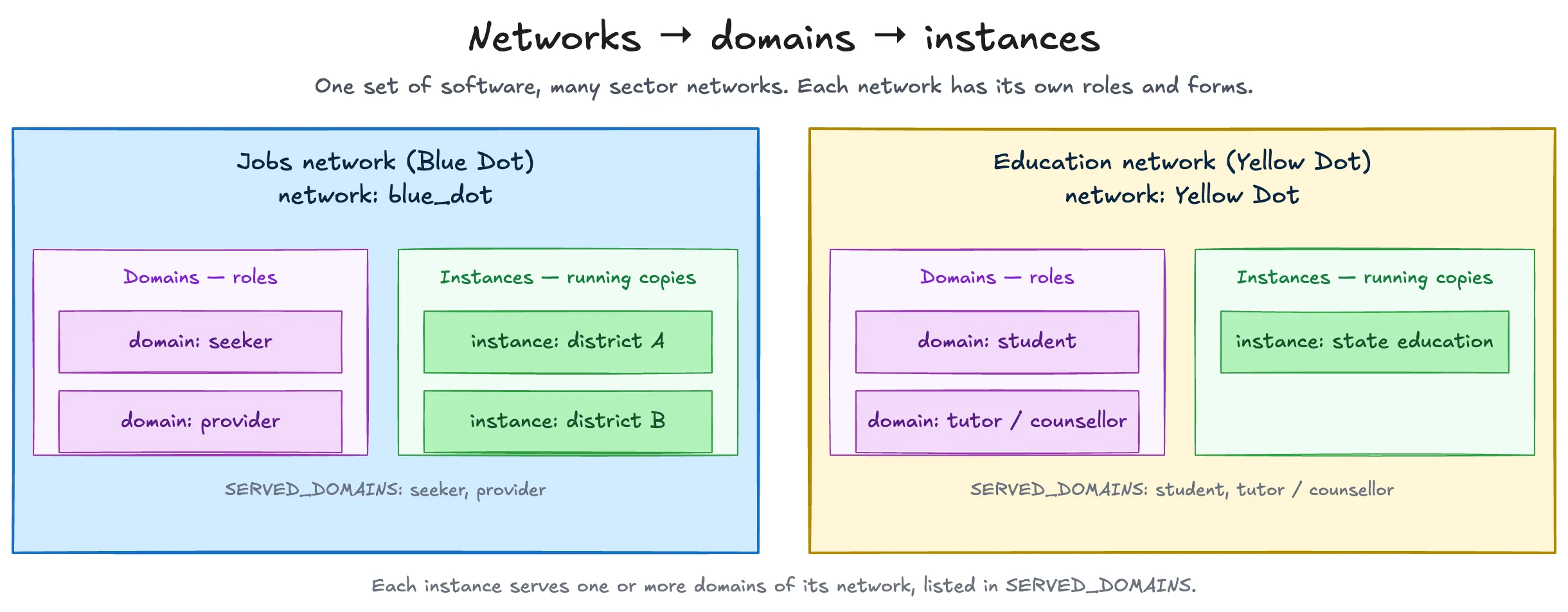
When you add a feature or a read endpoint, decide which domain and participant type it belongs to, and which instance layer it reads from, before writing code. The two read layers (instance-local and inter-instance) are covered in Read & Write Paths.