The Blue Dot Lifecycle
Every participant — a job seeker, a job provider, or a service provider — goes through the same seven steps to become a Blue Dot: a live, verified, discoverable entry in the system.
Each step is either done by an entity (an aggregator, acting on the participant’s behalf) or by the participant themselves. The DPGs needed for every step already exist and are ready to configure — an adaptor configures what is already built rather than building it.
The seven steps
Section titled “The seven steps”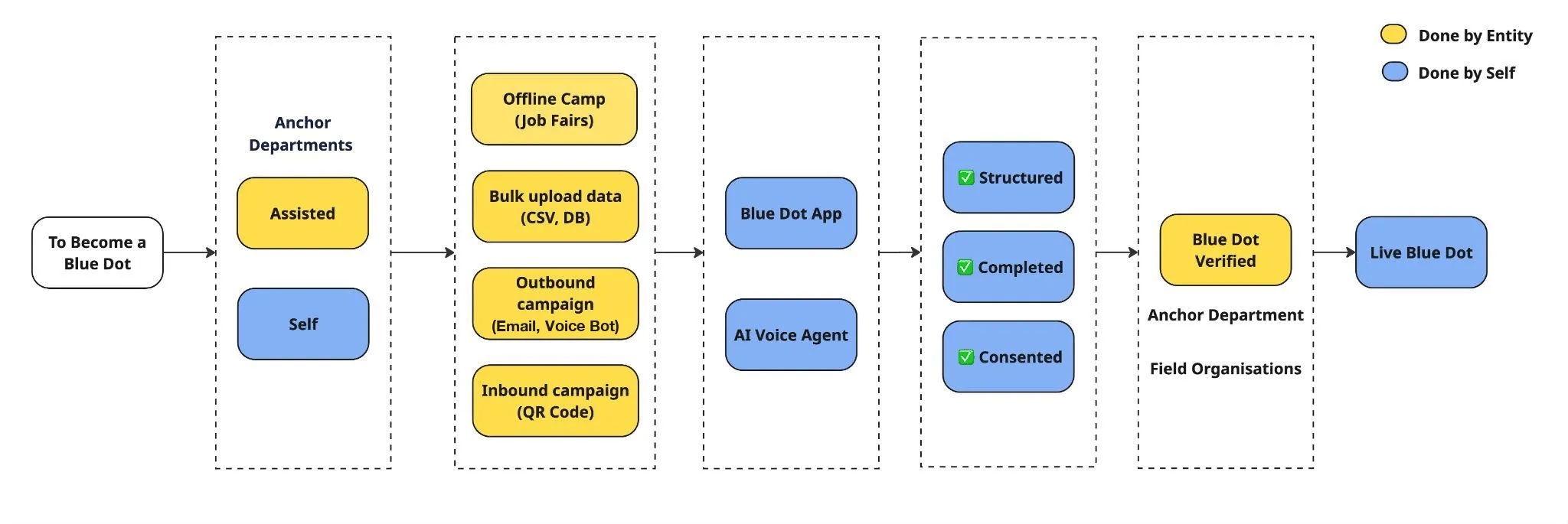
Decide who should be brought in, and identify the aggregator with the reach and trust to actually get to them.
Assisted or self. A configuration choice made per campaign or geography — not a technical build.
One of four ready-made intake methods: offline camp, bulk upload, outbound campaign, inbound QR campaign.
AI Voice Agent (primary) or Blue Dot Webapp (fallback) — both writing into the same underlying profile.
Structured, completed, consented. Applied automatically before a profile can go live.
A human review by the adaptor or aggregator — the one human-in-the-loop step in the journey, by design.
Visible, discoverable and eligible to be matched. Discover and Connect become available.
Who does what
Section titled “Who does what”| Step | Done by | Where it happens |
|---|---|---|
| 1. To Become a Blue Dot | Adaptor | Off-platform — a scoping and convening decision |
| 2. Choose the route in | Adaptor or field partner | Configuration, per campaign or geography |
| 3. Data collection | Aggregator, on the participant’s behalf | Aggregator DPG |
| 4. Completing the profile | The participant | AI Voice Agent or Blue Dot Webapp → Signals DPG |
| 5. Verification checks | The system | Signals DPG |
| 6. Blue Dot Verified | Adaptor or aggregator — a person | Aggregator DPG |
| 7. Live Blue Dot | The network | Signals DPG (+ voice bot) |
1. To Become a Blue Dot
Section titled “1. To Become a Blue Dot”The starting point for any participant type: a job seeker looking for work, a job provider with a vacancy, or a service provider offering support such as counselling, upskilling, assessment or placement help.
The work at this step is identification — who should become a Blue Dot, and on what criteria. The adaptor decides the cohort, and identifies the aggregator: the local field partner or organisation with reach and trust on the ground who can actually get to them.
See Aggregators for who qualifies, and Activating Blue Dots in a District for how a district picks its first use case.
2. Choose the route in
Section titled “2. Choose the route in”The adaptor (or its field partner) chooses how a given group will be onboarded:
- Assisted — the adaptor or field team brings the participant in on their behalf.
- Self — the participant starts the process on their own.
Both routes are supported out of the box. This is a configuration choice made per campaign or geography, not a technical build.
In the Aggregator DPG this is expressed as a per-link registration_mode, declared under aggregator.registration_modes in aggregator.config.yaml. Each mode resolves to a submission shape — account_only (create the account now, complete the profile later) or account_and_profile (capture everything in one pass). The database column is just a key; the config is the single source of truth.
3. Data collection (assisted route)
Section titled “3. Data collection (assisted route)”Where onboarding is assisted, the adaptor gathers participant data through whichever method fits the context. All four are ready-made intake methods on the Aggregator DPG — there is no need to build a separate tool for each.
| Intake method | What it looks like | What it uses |
|---|---|---|
| Offline camp | Data collected in person, e.g. at a job fair | Aggregator portal, assisted entry |
| Bulk upload | An existing list (CSV, database) imported in one go | CSV upload → async background worker → bulk-create into Signals |
| Outbound campaign | The adaptor, via the aggregator, reaches out proactively over email or a voice bot | Notifications + voice DPG |
| Inbound campaign | The participant scans a QR code shared by the aggregator and starts on their own | Shareable registration links, with roll-up metrics |
4. Completing the profile (self route)
Section titled “4. Completing the profile (self route)”Whether the participant arrived through assisted intake or came in on their own, the profile is completed through one of two self-service channels:
- AI Voice Agent (primary) — a call-based option, best suited to participants who prefer speaking over typing. The prompts driving it are themselves published as DPGs. See AI Voice Agent Prompts.
- Blue Dot Webapp (fallback) — a self-serve web app built on the Signals DPG.
Both channels write into the same underlying profile, handled by the Signals DPG, which already has the participant type — Job Seeker, Job Provider or Service Provider — defined and ready to use. See Participant Profiles.
5. Verification checks
Section titled “5. Verification checks”Before a profile can go live, three checks are applied:
- Structured — the data is in the shape the schema expects.
- Completed — all required fields are filled in.
- Consented — consent has been captured.
These are built into the system. Nothing here needs to be custom-built by the adaptor. Because the checks run against the item schema, changing what “structured” and “completed” mean is a schema edit, not a code change.
6. Blue Dot Verified
Section titled “6. Blue Dot Verified”A final review by the adaptor or the aggregator, confirming the profile is genuine and ready to go live.
The review happens on the Aggregator DPG, against the fields that can be verified. The adaptor checks with the aggregator that the details have been verified.
7. Live Blue Dot
Section titled “7. Live Blue Dot”The participant is now live: visible to others in the system and eligible to be matched — a job seeker surfaced to employers, a vacancy surfaced to job seekers, or a service provider discoverable by either.
From here, two capabilities are available across the Signals DPG and the voice bot:
- Discover — being found by, and finding, relevant matches.
- Connect — reaching out to, or being reached by, a match.
The lifecycle in practice
Section titled “The lifecycle in practice”These same seven steps played out on the ground in Ghaziabad and Dharwad — one cohort of job seekers, one cohort of job providers, using different intake methods. See The lifecycle in practice on the Pilots page for both traces, step by step.